







Mobile application development: Building scalable cross-platform experiences
Enterprise mobile apps fail when teams treat mobile delivery as a smaller version of web development.
A strong mobile architecture must account for device constraints, operating-system behavior, security, data access, offline states, APIs, and user workflows from the start.
For US enterprises, cross-platform development can provide a practical way to support iOS and Android while keeping core application logic consistent. The approach works best when teams separate business rules from presentation, define clear API boundaries, protect sensitive data, and account for platform-specific behavior.
Key takeaways
Area | Key point |
Cross-platform architecture | Share business logic and common UI components where the application requirements allow it. |
Native capabilities | Use platform-specific code when the application needs OS-level services or device features. |
Application layers | Separate presentation, domain, data, and integration responsibilities to control dependencies. |
API integration | Treat APIs as controlled contracts between the mobile client and enterprise systems. |
Security | Protect identity, credentials, tokens, local data, network traffic, and device access. |
Offline operation | Define what users can view, create, update, and synchronize when connectivity fails. |
Testing | Test shared logic once where practical, then test platform-specific behavior independently. |
Release management | Maintain separate platform builds, signing processes, store requirements, and release controls. |
Enterprise integration | Connect mobile applications to identity systems, APIs, databases, workflow systems, and existing enterprise software. |
Long-term maintenance | Keep modules small, dependencies explicit, and platform-specific code isolated. |
What cross-platform mobile development means for enterprises
Cross-platform mobile development uses a shared development approach to create applications for more than one operating system.
A team can share application logic, data models, networking code, validation rules, and selected interface components. The team can then add native code where a platform requires a specific implementation.
This model differs from fully native development. Native development uses platform-specific technologies such as Swift and SwiftUI for Apple platforms or Kotlin and Jetpack Compose for Android. Cross-platform frameworks use a common development model while still allowing access to native platform capabilities.
Flutter uses Dart and provides its own rendering framework. It can also communicate with platform-specific code through platform channels. React Native uses JavaScript or TypeScript with native platform integration and a cross-platform rendering architecture that, as of recent releases, runs on the New Architecture with Fabric by default.
Enterprises should choose the approach based on application requirements rather than framework popularity.
A useful assessment should examine:
- Required mobile platforms
- Device capabilities
- Offline requirements
- Security controls
- API architecture
- Identity and access management
- Data sensitivity
- Performance requirements
- Accessibility requirements
- Existing engineering skills
- Release processes
- Long-term maintenance needs
The central question should remain simple: Which architecture can support the required business functions while keeping code ownership and operational complexity under control?
Why enterprises use cross-platform application architecture
Cross-platform development can reduce duplication when the same business rules support multiple mobile platforms.
For example, an enterprise application might use the same rules for:
- Employee authentication
- Expense submission
- Order approval
- Inventory updates
- Customer account access
- Field-service records
- Document review
- Workflow approvals
The application can keep these rules in shared modules instead of implementing the same behavior separately for iOS and Android.
Teams can also share API clients, serialization models, validation logic, error handling, analytics interfaces, and testing utilities.
However, shared code does not remove platform differences.
Apple and Android expose different operating-system APIs, lifecycle behavior, permission models, notification systems, device capabilities, and interface conventions. Apple documentation describes UIKit lifecycle and environment handling around scenes, traits, and system events. Android guidance also requires applications to account for configuration changes, resource constraints, and component lifecycles.
A good cross-platform architecture therefore combines shared application logic with controlled native integration.
How should teams separate shared and native functionality?
Teams should divide the application into clear technical boundaries.
A typical structure can include:
- Presentation layer
- Application or domain layer
- Data layer
- Integration layer
- Platform layer
- The presentation layer handles screens, navigation, user input, accessibility, and visual state.
- The application layer handles business rules and use cases.
- The data layer handles repositories, local storage, caching, and remote data access.
- The integration layer handles communication with enterprise APIs and external services.
- The platform layer handles device-specific capabilities.
This structure prevents the business layer from depending directly on iOS or Android APIs.
Android’s official architecture guidance also recommends clear boundaries between UI and data responsibilities, with an optional domain layer for applications that need additional separation of business logic.
Flutter’s architecture guidance similarly separates UI and data responsibilities and emphasizes clear interfaces between application components.
Choosing the right cross-platform technology
No single framework fits every enterprise application.
Teams should compare the framework against the application rather than forcing requirements into a preferred technology.
What should teams evaluate before choosing a framework?
Teams should evaluate:
- Native API access
- Development language
- UI rendering model
- Performance requirements
- Offline support
- Testing tools
- Package ecosystem
- Enterprise authentication support
- Build and release tooling
- Developer availability
- Platform support
- Long-term maintenance requirements
Flutter provides a framework for building applications from a shared codebase and supports direct integration with platform-specific functionality. Its architecture includes a framework layer, rendering system, engine, and platform embedder.
React Native provides a cross-platform implementation with a rendering system that shares core components across supported platforms. Its current architecture includes Fabric, a rendering system built around a shared core implementation.
Native development remains important when an application depends heavily on platform-specific capabilities.
SwiftUI provides a declarative UI framework for Apple platforms and supports code sharing across Apple devices. Android uses Jetpack Compose as its modern declarative UI toolkit.
The technology decision should follow the application’s technical requirements.
Building the application architecture
A mobile application needs more than screens and API calls.
The architecture must define how information moves through the application and how each component responds to changes.
A common enterprise structure looks like this:
Mobile UI → application logic → repository → API or local data source
- The UI sends user actions to the application layer.
- The application layer applies business rules.
- The repository retrieves or stores data.
- The API layer communicates with enterprise services.
- A local data source can support offline operation where the business process requires it.
This structure also makes testing easier because each component has a defined responsibility.
How does separation of concerns improve mobile applications?
Separation of concerns keeps unrelated responsibilities apart.
A screen should not contain authentication logic, database operations, network retry rules, and business validation in one class.
Instead:
- UI components render state.
- State holders coordinate screen behavior.
- Use cases apply business rules.
- Repositories provide data.
- Data sources communicate with APIs or storage.
- Platform adapters communicate with device services.
Android’s architecture guidance recommends clear responsibility boundaries, repositories, data layers, UI layers, and unidirectional data flow.
Flutter also recommends separation of concerns, layered architecture, a single source of truth, unidirectional data flow, and testability as core architectural concepts.
Designing the mobile presentation layer
The mobile interface should reflect the device and operating system on which it runs.
A shared application can maintain common product behavior while adapting navigation, spacing, controls, gestures, typography, and system interactions for each platform.
Apple applications need to respond to lifecycle events and environmental changes such as interface traits and scene changes. Android applications need to account for configuration changes, screen sizes, process termination, and different device form factors.
The presentation layer should therefore avoid assumptions about one fixed screen size.
Good mobile UI architecture accounts for:
- Portrait and landscape layouts
- Phones and tablets
- Foldable devices
- Dynamic text size
- Accessibility settings
- Dark mode
- Keyboard input
- Touch interaction
- System navigation
- Screen rotation
- Multitasking
- Localization
Android’s current guidance specifically addresses adaptive layouts across phones, tablets, foldables, ChromeOS devices, car displays, and other form factors.
Managing application state
Application state represents what the application knows at a given point in time.
Examples include:
- Signed-in user
- Current account
- Selected order
- Pending form
- Network status
- Synchronization status
- Loading state
- Validation errors
- Permission state
Poor state management creates inconsistent screens and difficult debugging.
A stronger model keeps state in appropriate state holders instead of attaching important business data to temporary UI components.
Android guidance recommends unidirectional data flow, where state moves toward the UI and user events move toward the component that owns the relevant state.
The same principle can work across mobile frameworks.
A typical flow looks like:
- The user performs an action.
- The UI sends an event.
- The application layer validates the event.
- The data layer retrieves or changes information.
- The state holder receives the result.
- The UI renders the new state.
This model makes application behavior easier to test and trace.
API architecture for mobile applications
Mobile applications rarely operate as isolated systems.
Enterprise apps usually connect to APIs that expose customer data, employee records, transactions, documents, workflows, identity services, or other business functions.
A mobile application should not connect directly to enterprise databases.
Instead, an API layer should define controlled access to enterprise resources.
API contracts should define:
- Request formats
- Response formats
- Authentication
- Authorization
- Validation
- Error responses
- Pagination
- Versioning
- Rate controls
- Idempotency
- Timeout behavior
- Retry behavior
API responses should contain only the information that the mobile client requires.
This approach reduces unnecessary data transfer and limits exposure of internal systems.
Teams can also place an API gateway or backend-for-frontend layer between mobile clients and enterprise services when the architecture requires it.
For complex environments, teams can connect mobile applications to microservices, enterprise service buses, event systems, identity providers, workflow platforms, and SaaS applications through controlled integration layers.
How does API-first development support enterprise mobile applications?
API-first development treats the API contract as a central part of application design.
The team defines resources, operations, schemas, authentication requirements, errors, and versioning before the mobile interface depends on them.
This approach helps separate mobile development from backend implementation.
A mobile team can build against a stable contract while backend teams implement or change internal services behind that contract.
The approach also supports multiple clients.
A business can expose the same core service to:
- iOS applications
- Android applications
- Web applications
- Internal portals
- Partner systems
- Customer applications
For broader enterprise architecture, teams can connect mobile API design with API-first application development for enterprise scalability without coupling the mobile client directly to internal service implementations.
The API contract should remain stable even when backend components change.
Local storage and offline operation
Mobile connectivity can fail for many reasons.
Users can enter elevators, travel through low-coverage areas, switch networks, or lose connectivity during a transaction.
An enterprise mobile application must define its offline behavior before development begins.
Teams should classify data into categories such as:
- Read-only reference data
- Cached user data
- User-created records
- Pending transactions
- Sensitive data
- Data that requires immediate server validation
The application can cache appropriate information locally.
The application can also store pending actions and synchronize them when connectivity returns.
However, teams should not treat offline mode as a simple cache feature.
Offline workflows require rules for:
- Conflict detection
- Conflict resolution
- Retry behavior
- Duplicate prevention
- Timestamp handling
- Record ownership
- Partial synchronization
- Failed transactions
Android guidance recommends persistent models and local data storage where appropriate because operating-system processes can stop and recreate application components.
Security architecture for enterprise mobile apps
Enterprise mobile applications often process sensitive business information.
Security therefore needs to cover the entire application path.
The security model should address:
- User authentication
- Authorization
- Session management
- Token storage
- API authentication
- Encryption in transit
- Encryption at rest
- Certificate validation
- Device security
- Application permissions
- Logging
- Audit records
- Data retention
- Remote session controls
Applications should avoid storing long-lived credentials in plain text.
Authentication tokens should use secure platform storage where appropriate.
Sensitive operations should require server-side authorization even when the mobile interface hides or disables an action.
The API should never trust the client simply because the client authenticated successfully.
Authorization belongs on the server.
Identity and access management
Enterprise applications often connect to corporate identity systems.
Common enterprise requirements include:
- Single sign-on
- Multi-factor authentication
- Role-based access control
- Group-based access
- Conditional access
- Session expiration
- Device registration
- Account recovery
- Audit logging
The mobile application should request only the permissions required for its business functions.
The identity layer should issue access tokens with appropriate scopes and lifetimes.
The backend should validate tokens and enforce authorization for every protected operation.
The mobile interface should also respond clearly when the user’s authorization changes.
For example, a user may lose access to a department, project, account, or workflow while the application remains installed.
The server should return the appropriate authorization response, and the application should update its local state.
Data protection on the device
Local storage creates another security boundary.
Teams should classify which data can reside on the device and which data should remain server-side.
Useful controls include:
- Encrypted databases
- Secure key storage
- Protected files
- Minimal local retention
- Session timeout
- Screen privacy controls where required
- Clipboard restrictions where appropriate
- Secure logging
- Data removal after account logout
Developers should also prevent sensitive information from appearing in crash reports or debug logs.
The application should separate diagnostic information from confidential business data.
Security reviews should inspect both shared code and native platform code.
Push notifications and background processing
Push notifications can support approvals, alerts, status changes, and workflow events.
However, a notification should not expose sensitive information unnecessarily.
For example, a notification can say that an approval requires attention without displaying confidential transaction details on a locked screen.
Background processing also requires platform-specific handling.
Mobile operating systems control when applications can execute background work.
The architecture should therefore treat background tasks as opportunistic rather than assuming continuous execution.
Teams should design synchronization tasks to handle:
- Delayed execution
- Duplicate execution
- Interrupted execution
- Expired authentication
- Network failure
- Partial completion
The backend should also support idempotent operations where duplicate requests could create unwanted effects.
Device capabilities and native integration
Cross-platform development does not mean eliminating native code.
Enterprise applications may require:
- Camera access
- Bluetooth
- GPS
- Biometrics
- Secure storage
- NFC
- Background services
- File systems
- Push notifications
- Health or sensor APIs
- Platform authentication
- Native document viewers
Flutter, for example, provides platform channels that allow Dart code to communicate with Kotlin or Java on Android and Swift or Objective-C on Apple platforms.
React Native also provides native integration mechanisms for platform-specific requirements.
Teams should isolate native integrations behind interfaces.
The shared application code can then call a defined service rather than importing platform-specific APIs throughout the codebase.
Testing strategy for cross-platform applications
Cross-platform testing needs multiple levels.
- Unit tests should verify business rules and data transformations.
- Integration tests should verify communication between modules.
- API tests should verify contracts and error handling.
- UI tests should verify critical user flows.
- Device tests should verify platform-specific behavior.
- Security tests should verify authentication, authorization, storage, and network controls.
A useful test structure includes:
Unit testing
- Unit tests should cover:
- Validation
- Business rules
- Data mapping
- Calculations
- State transitions
- Error handling
Integration testing
Integration tests should cover:
- API communication
- Local database behavior
- Authentication flows
- Synchronization
- Repository behavior
UI testing
UI tests should cover:
- Login
- Navigation
- Form submission
- Search
- Data updates
- Error states
- Offline states
- Permission flows
Platform testing
Platform testing should cover:
- iOS lifecycle behavior
- Android lifecycle behavior
- Device permissions
- Screen sizes
- Rotation
- Notifications
- Camera and sensor access
- Background processing
Teams should not assume that shared code removes the need for platform testing.
Performance engineering for mobile applications
Mobile applications operate under device constraints.
Applications must account for CPU, memory, battery, storage, network conditions, and rendering workload.
Performance work should begin with measurement.
Teams should monitor:
- Application startup
- Screen rendering
- Network latency
- API response size
- Database queries
- Memory consumption
- Battery usage
- Image processing
- Background work
Developers should avoid unnecessary network requests.
They should also avoid loading large datasets when the screen needs only a small subset.
- Pagination can reduce data transfer.
- Caching can reduce repeated requests.
- Lazy loading can reduce initial work.
- Image resizing can reduce memory use.
Developers should also avoid blocking the main UI thread with expensive operations.
Android architecture guidance specifically recommends keeping long-running work off the main thread and assigning concurrency responsibility to the types that perform that work.
Accessibility in enterprise mobile applications
Accessibility should form part of the application architecture rather than a final testing task.
The application should support:
- Screen readers
- Dynamic text sizing
- Sufficient contrast
- Accessible labels
- Logical focus order
- Large touch targets
- Keyboard interaction where applicable
- Reduced motion preferences
- Clear error messages
Native accessibility APIs can help applications communicate interface semantics to assistive technologies.
Cross-platform frameworks also provide accessibility features, but teams should test the resulting application on actual target platforms.
An interface that looks correct can still produce poor results with VoiceOver or TalkBack.
Localization and regional requirements
US enterprise applications may serve users across multiple states, regions, and language groups.
Localization affects more than translated text.
Teams should account for:
- Date formats
- Time formats
- Currency
- Number formats
- Time zones
- Address formats
- Measurement units
- Text expansion
- Right-to-left languages where required
The application should keep locale-specific content outside core business logic.
The backend should also define how dates and times move between systems.
Teams should store timestamps in a consistent representation and convert them for display at the appropriate interface layer.
Mobile analytics and observability
Enterprise applications need operational visibility.
Analytics can show how users interact with application functions, while observability can help engineering teams identify technical problems.
Teams should define events carefully.
Useful technical signals include:
- Crash reports
- Failed API calls
- Authentication failures
- Synchronization errors
- Application startup time
- Screen load duration
- Network failures
- Device information
- Application version
Analytics should follow the organization’s privacy and data governance rules.
Developers should avoid collecting sensitive information unless the business requirement clearly justifies it.
Logs should also use structured formats so engineering teams can filter and correlate events across systems.
Application lifecycle management
Mobile applications require ongoing maintenance after initial release.
Teams must maintain:
- Source code
- Dependencies
- Build tools
- Certificates
- Signing keys
- App store configurations
- API contracts
- Security controls
- Test suites
- Release notes
- Documentation
Dependency updates require controlled testing.
A framework update can change rendering behavior, platform APIs, build requirements, or package compatibility.
Teams should therefore maintain reproducible builds and versioned dependencies.
Release processes should also separate development, testing, staging, and production environments.
How should enterprises organize mobile development teams?
A cross-platform project can involve several engineering roles.
Typical responsibilities include:
- Product management
- UX design
- Mobile engineering
- Backend engineering
- API engineering
- QA engineering
- Security engineering
- DevOps
- Architecture
- Technical documentation
The team should define ownership for shared modules.
Without clear ownership, shared code can become a dependency bottleneck.
Teams should also define coding standards, branching rules, review requirements, testing expectations, and release responsibilities.
For organizations that need additional engineering capacity, enterprise mobile application development services can provide access to teams that work across mobile architecture, APIs, security, testing, and enterprise integration.
Building custom enterprise mobile applications
Enterprise requirements rarely fit a generic application model.
A financial institution may require account access, transaction approval, identity controls, and audit records.
A healthcare organization may require secure access to patient information, scheduling, messaging, and role-based permissions.
A field-service organization may need offline work orders, GPS, photos, signatures, inventory updates, and synchronization.
A manufacturer may need equipment records, inspection workflows, maintenance tasks, and inventory information.
These requirements create application-specific architecture decisions.
custom mobile application development should therefore start with business workflows, data requirements, integration boundaries, security controls, and user roles.
The team should then map those requirements to application modules.
How should enterprise workflows shape mobile architecture?
Teams should begin with the user’s task rather than the screen.
A workflow may follow this pattern:
- User authenticates.
- Application retrieves authorized work.
- User selects a task.
- Application loads relevant data.
- User enters or changes information.
- Application validates the input.
- Application stores the pending change.
- Application sends the transaction to the backend.
- Backend applies business rules.
- Application receives the result.
- Application updates local state.
- Application records the appropriate audit event.
This approach exposes technical requirements early.
The workflow may require offline storage, background synchronization, role checks, transaction IDs, conflict handling, or audit logging.
For complex enterprise processes, teams can also connect mobile architecture with custom application development for complex enterprise workflows so that mobile functions remain part of the larger application architecture.
Hiring and structuring mobile engineering capacity
Enterprises can build internal teams, use external engineering partners, or combine both approaches.
The decision depends on:
- Existing engineering capacity
- Application complexity
- Security requirements
- Delivery schedule
- Platform requirements
- Internal ownership needs
- Long-term maintenance plans
When organizations need additional specialists, they may hire mobile app developers with experience in iOS, Android, cross-platform frameworks, APIs, testing, security, and enterprise integration.
Technical screening should focus on architecture rather than framework syntax alone.
A strong mobile engineer should know how to:
- Separate application layers
- Design API clients
- Handle lifecycle changes
- Protect sensitive data
- Test asynchronous behavior
- Diagnose performance issues
- Work with native APIs
- Build accessible interfaces
- Handle offline states
- Maintain production releases
Working with an enterprise mobile application development company
External engineering teams can support architecture, development, testing, integration, maintenance, or the full application lifecycle.
Organizations should define ownership before work begins.
The agreement should identify:
- Source-code ownership
- Repository access
- Documentation requirements
- Security responsibilities
- API ownership
- Cloud resources
- Build credentials
- App store accounts
- Release approval
- Incident response
- Support responsibilities
- Dependency management
The client should retain appropriate access to production systems and critical development assets.
The engineering partner should also document architecture decisions and operational procedures.
What should organizations look for in mobile application development services?
Organizations should assess technical capability against the application lifecycle.
A suitable service provider should support areas such as:
- Mobile architecture
- Cross-platform development
- Native development
- API integration
- Identity integration
- Data storage
- Offline synchronization
- Security
- Automated testing
- Performance testing
- CI/CD
- App store releases
- Application monitoring
- Maintenance
The provider should also explain tradeoffs clearly.
A proposal that recommends one framework for every application deserves technical review.
Architecture should follow requirements.
Enterprise integration and existing systems
Most enterprise mobile applications need to connect with existing software.
The integration layer may include:
- ERP systems
- CRM platforms
- HR systems
- Payment services
- Identity providers
- Document systems
- Data warehouses
- Workflow platforms
- Messaging systems
- Enterprise APIs
- SaaS platforms
Direct point-to-point connections can increase coupling.
An API gateway, integration platform, or service layer can provide controlled boundaries between the mobile application and existing systems.
The integration architecture should define ownership for data, authentication, errors, retries, and transactions.
Connecting mobile applications with full-stack systems
Mobile applications often form one client within a larger software platform.
The backend may include:
- API services
- Authentication services
- Business services
- Databases
- Caching
- Message brokers
- File storage
- Search services
- Monitoring
- Administration portals
Teams should keep mobile concerns separate from backend concerns.
The mobile application should call APIs rather than duplicate backend business rules.
For broader application planning, full stack web development strategies for enterprise applications can complement mobile architecture by defining how web clients, mobile clients, APIs, services, and data systems share enterprise capabilities.
Modernizing legacy enterprise systems for mobile access
Older enterprise systems often lack APIs that support modern mobile clients.
Teams can add an integration layer rather than rebuilding the entire legacy system.
Possible approaches include:
- API wrappers
- Service adapters
- Integration middleware
- Backend-for-frontend services
- Event-driven integration
- Data synchronization services
- Identity gateways
The approach should protect the legacy system from direct mobile dependencies.
Teams should also avoid copying large amounts of legacy business logic into the mobile application.
The backend should remain the authoritative location for business rules that require centralized control.
Organizations can also connect mobile initiatives with modernizing legacy enterprise application environments when a wider application modernization program requires new APIs, service boundaries, cloud deployment, or integration changes.
Release engineering for iOS and Android
Mobile release processes differ from ordinary web deployment.
Teams must build, sign, test, package, and distribute applications through platform-specific channels.
Release preparation should include:
- Version management
- Build configuration
- Environment configuration
- Signing
- Provisioning
- Store metadata
- Privacy information
- Permissions
- Test builds
- Production approval
The build pipeline should prevent development credentials or test endpoints from reaching production builds.
CI/CD systems can automate repeatable build and test tasks.
Teams should keep production signing credentials under controlled access.
How should teams handle mobile application updates?
Teams should treat application updates as controlled releases.
Each release should define:
- Version number
- Changes
- API compatibility
- Database migration requirements
- Security changes
- Known issues
- Rollback or mitigation procedures
Backend teams should maintain API compatibility when older mobile versions remain active.
This requirement matters because users do not install every mobile update at the same moment.
The server should therefore support supported application versions according to the organization’s release policy.
Cost factors in cross-platform development
Application cost depends on architecture and requirements rather than platform count alone.
Major cost factors include:
- Number of platforms
- Number of screens
- Business logic complexity
- API requirements
- Offline workflows
- Security controls
- Identity integration
- Native device features
- Data storage
- Testing scope
- Accessibility
- Localization
- Backend development
- Administration tools
- Monitoring
- Maintenance
Cross-platform development can reduce duplicated implementation work when application requirements overlap.
However, native integrations still require platform-specific engineering.
Teams should therefore estimate shared development and platform-specific work separately.
Common architecture mistakes
Several patterns can create long-term maintenance problems.
- Putting business logic inside screens
- Screens should not contain the full business process.
- Business rules belong in appropriate application or domain components.
- Calling APIs directly from UI components
- Direct API calls from screens create coupling.
- Repositories or service abstractions should control data access.
- Treating offline support as caching
- Offline operation requires transaction and synchronization rules.
- Caching alone does not resolve conflicting changes.
- Sharing every interface component
- Some platform behaviors should remain native.
- Teams should share code where the application benefits from common behavior, not where sharing creates awkward platform behavior.
- Ignoring application lifecycle events
- Mobile operating systems can stop, recreate, suspend, or background applications.
- The architecture should preserve important state outside temporary UI components.
- Storing sensitive data without classification
- Teams should decide which information can remain on a device before implementation.
- Building without API contracts
- Unclear API boundaries create delays between mobile and backend teams.
- Testing only on simulators
- Real devices expose differences in performance, permissions, sensors, notifications, connectivity, and lifecycle behavior.
A practical implementation process
A structured delivery process can reduce architecture problems.
Step 1: Define business workflows
- Document the actions users must complete.
- Identify actors, permissions, inputs, outputs, exceptions, and approval steps.
Step 2: Define application boundaries
- Separate mobile responsibilities from backend responsibilities.
- Identify the systems that provide authoritative business data.
Step 3: Define API contracts
- Document endpoints, schemas, authentication, errors, versioning, and transaction behavior.
Step 4: Select the application architecture
- Choose shared modules, platform modules, data storage, state management, and integration patterns.
Step 5: Select the development framework
- Compare Flutter, React Native, native iOS, native Android, or a mixed architecture against application requirements.
Step 6: Build the security model
- Define authentication, authorization, token handling, local storage, network security, logging, and audit requirements.
Step 7: Build the core application layers
- Create the presentation, application, data, integration, and platform boundaries.
Step 8: Implement critical workflows
- Build the highest-value workflows first.
- Verify state handling, errors, permissions, and API behavior.
Step 9: Add native capabilities
- Implement device-specific functions behind clear interfaces.
Step 10: Test across target devices
- Test supported operating systems, device sizes, network conditions, permissions, and lifecycle states.
Step 11: Establish release controls
- Configure CI/CD, signing, environments, app store processes, monitoring, and release approval.
Step 12: Document operational ownership
- Record architecture decisions, support procedures, API dependencies, security responsibilities, and release processes.
How can enterprises keep cross-platform applications maintainable?
Maintenance starts with architecture.
Teams should keep modules small and responsibilities clear.
They should also:
- Review dependencies regularly
- Remove unused packages
- Keep API contracts documented
- Maintain automated tests
- Monitor application errors
- Review security controls
- Document native integrations
- Keep build pipelines reproducible
- Track supported application versions
- Separate configuration from code
A clean dependency structure also helps teams replace individual components without rewriting the application.
The same principle applies to API integrations.
A repository should depend on an interface rather than a specific backend implementation where practical.
When should an enterprise choose native development?
Cross-platform development does not fit every application.
Native development may make more sense when an application depends heavily on:
- Advanced platform APIs
- Specialized device hardware
- Complex graphics
- Platform-specific accessibility behavior
- Deep background processing
- Highly specialized performance requirements
- Extensive native SDK integration
A native approach can also make sense when the organization already maintains separate iOS and Android engineering teams with strong platform expertise.
The choice should follow technical requirements.
When should an enterprise choose cross-platform development?
Cross-platform development can fit applications where:
- iOS and Android share most business rules
- Teams need common application logic
- API behavior remains consistent across platforms
- The application uses common device capabilities
- The organization wants one primary application codebase
- Native integrations remain limited and well-defined
- The application requires regular feature updates across both platforms
The architecture should still reserve room for platform-specific behavior.
What does a strong enterprise mobile architecture look like?
A strong architecture establishes clear boundaries.
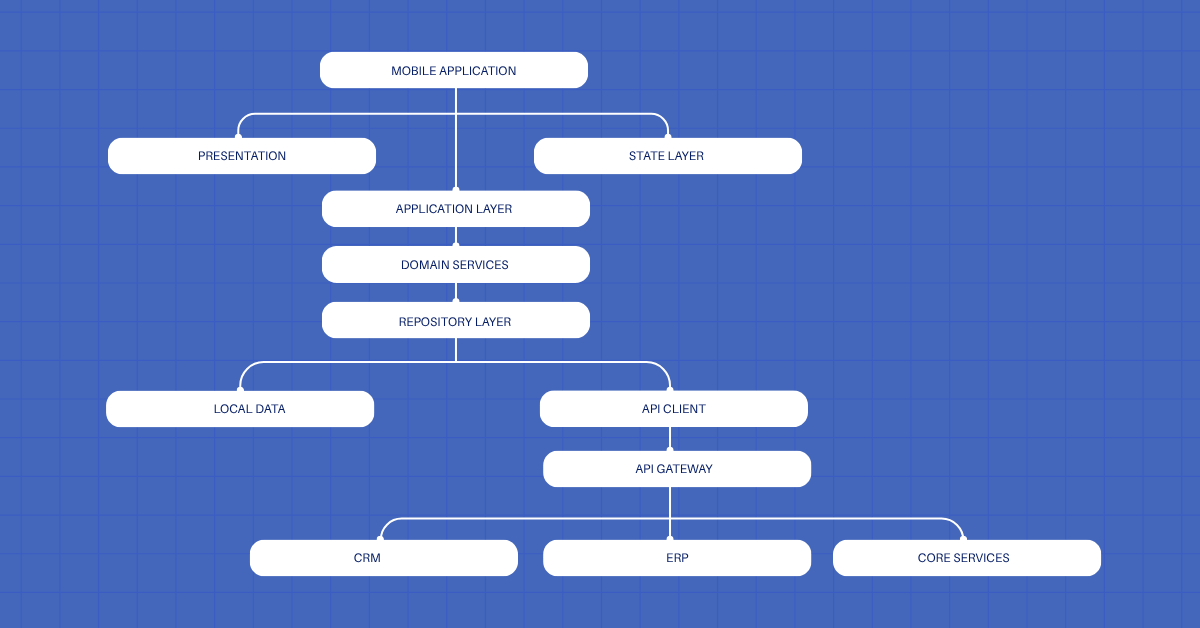
The exact structure will vary by application.
The important principle remains consistent: each layer should have a clear responsibility and a controlled dependency path.
Enterprise mobile application development services in the United States
US organizations often need partners that understand both technical architecture and the regulatory, security, and operational environment common to American enterprises.
Mobile application development services that focus on enterprise work typically cover architecture design, cross-platform or native implementation, identity integration, offline synchronization, security reviews, testing, CI/CD, and ongoing maintenance.
Enterprise app development solutions that include mobile components should treat the mobile client as one part of a larger system rather than an isolated product.
Cross-platform app development services USA providers should be able to demonstrate experience with both shared codebases and platform-specific native modules.
An enterprise mobile app development company that works with US clients should also be prepared to discuss data residency, SOC 2 or similar controls, App Store and Google Play compliance, and support for corporate identity providers such as Azure AD, Okta, or Ping.
Mobile app development services USA teams that serve regulated industries (finance, healthcare, government contractors) need clear processes for audit logging, encryption, and access control.
Enterprise mobile applications need architecture that accounts for more than screen design.
The strongest implementations separate business rules from UI code, expose enterprise capabilities through controlled APIs, protect sensitive information, support appropriate offline workflows, and isolate platform-specific functions.
Cross-platform development can support these goals when teams apply clear architectural boundaries.
The framework matters, but architecture matters more.
A sound implementation starts with business workflows, data ownership, security requirements, API contracts, device capabilities, and operational responsibilities.
For US enterprises, the right mobile strategy should connect mobile clients with the broader application estate rather than treating the mobile application as an isolated product.
That approach gives engineering teams a clear structure for development, testing, release management, integration, and long-term maintenance.
FAQs
- What are enterprise mobile application development services?
They are specialized services that design, build, test, and maintain mobile applications for large organizations. These services cover architecture, security, API integration, offline support, identity management, and ongoing maintenance for both iOS and Android.
- Why are enterprises investing in custom mobile application development?
Generic apps rarely match complex internal workflows, security rules, or existing systems. Custom development lets companies create applications that fit their exact processes, data requirements, and compliance needs.
- What is the difference between native and cross-platform app development?
Native development uses platform-specific tools (Swift/SwiftUI for iOS, Kotlin/Jetpack Compose for Android). Cross-platform development uses a shared codebase (Flutter or React Native) while still allowing native code for platform-specific features.
- Why is cross-platform app development popular among enterprises?
It reduces duplicated work when the same business rules and logic apply to both iOS and Android. Teams can share large portions of code, speed up delivery, and keep core logic consistent across platforms.
- How do enterprise mobile apps improve business productivity?
They give employees and partners direct access to workflows, approvals, data entry, and status updates from any location. This cuts delays, reduces paper processes, and supports faster decision-making.
- What security measures should enterprises implement in mobile applications?
Key measures include secure authentication, token storage, encryption in transit and at rest, server-side authorization, limited local data storage, certificate validation, and clear session controls.
- How can scalable mobile application development support business growth?
A well-structured architecture with clear layers, stable API contracts, and modular design lets teams add new features, users, or integrations without rewriting the entire application.

Author